My Disney Experience on a PC.

nickys

Premium Member
The UK website seems to have a lot of broken links these days.

I just tried this way which I always use.

From the “hamburger” menu:
- Select Things to Do
- Select All Dining
- Use the drop down to select DHS
- Select 50s Prime Time (not the check availability box, just click the name
- Change to Lunch / Dinner
- Select Entrees etc.
 

mergatroid

Well-Known Member
Original Poster
The UK website seems to have a lot of broken links these days.

I just tried this way which I always use.

From the “hamburger” menu:
- Select Things to Do
- Select All Dining
- Use the drop down to select DHS
- Select 50s Prime Time (not the check availability box, just click the name
- Change to Lunch / Dinner
- Select Entrees etc.
Thanks but even that doesn't work for me? Only way it will let me select Lunch/ Dinner is under 'Meal Pricing'


and that just takes me to the same advertising page?

It's ok as I can use the app on my mobile but when I'm already settled for a few hours on my PC it's annoying that the site I ordered and bought our tickets on can't even bring up a menu for a meal.

Thanks though ❤️
 

nickys

Premium Member
Thanks but even that doesn't work for me? Only way it will let me select Lunch/ Dinner is under 'Meal Pricing'


and that just takes me to the same advertising page?

It's ok as I can use the app on my mobile but when I'm already settled for a few hours on my PC it's annoying that the site I ordered and bought our tickets on can't even bring up a menu for a meal.

Thanks though ❤️
Odd.

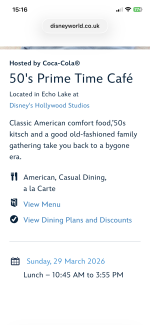
This is what I see from your link
IMG_2450.png
IMG_2450.png
Then clicking on the “View Menu in blue I see this

IMG_2451.png


Selecting Entrees I get this

IMG_2452.png
 

Register on WDWMAGIC. This sidebar will go away, and you'll see fewer ads.

Back
Top Bottom